IPTV Player for Fire TV Stick 4K, 4K Max & Cube
Fire TV devices don't have Google Play, so TIVRA is installed from tivratv.com with the free Downloader app. It takes about five minutes the first time, and updates afterwards are two presses from inside the app. These steps work on the Fire TV Stick 4K, Fire TV Stick 4K Max and Fire TV Cube.
TIVRA is a player: it has no channels of its own. You'll need your own provider login (Xtream Codes, M3U or a Stalker portal) or your own media library.
Sideload TIVRA with Downloader
- Install Downloader. Search for it in the Amazon Appstore on the Fire TV and install it.
- Find Developer options. Go to Settings › My Fire TV. If there is no Developer options entry, open Settings › My Fire TV › About and press the device name seven times. Developer options appears.
- Allow Downloader to install apps. Settings › My Fire TV › Developer options › Install unknown apps, then turn on Downloader.
- Download TIVRA. Open Downloader and enter the code 3059562, or type the address
tivratv.com/downloads/tivra-latest.apk. - Install. When the download finishes, press Install, then Open. Delete the downloaded file when Downloader offers; it frees space you'll want later.
The download is one universal file that works on every Fire TV, including older 32-bit models, so there's nothing to choose. TIVRA 3.3.6 fixed a launch crash on Fire OS 6 devices such as the first-generation Fire TV Stick 4K and Fire TV Cube, so install the current version rather than an old file.
First-run setup
- Create an account at tivratv.com/signup. Every plan starts with a 7-day free trial and no card is needed.
- Sign in with the code. TIVRA shows a short code on the TV. On your phone, open
tivratv.com/pair, sign in and type it. The TV signs itself in. - Add your provider. On the TV go to Settings › Providers › Add Provider, or add it from the web dashboard on your phone, which is much easier than typing a password with the Fire TV remote. Changes sync to the TV.
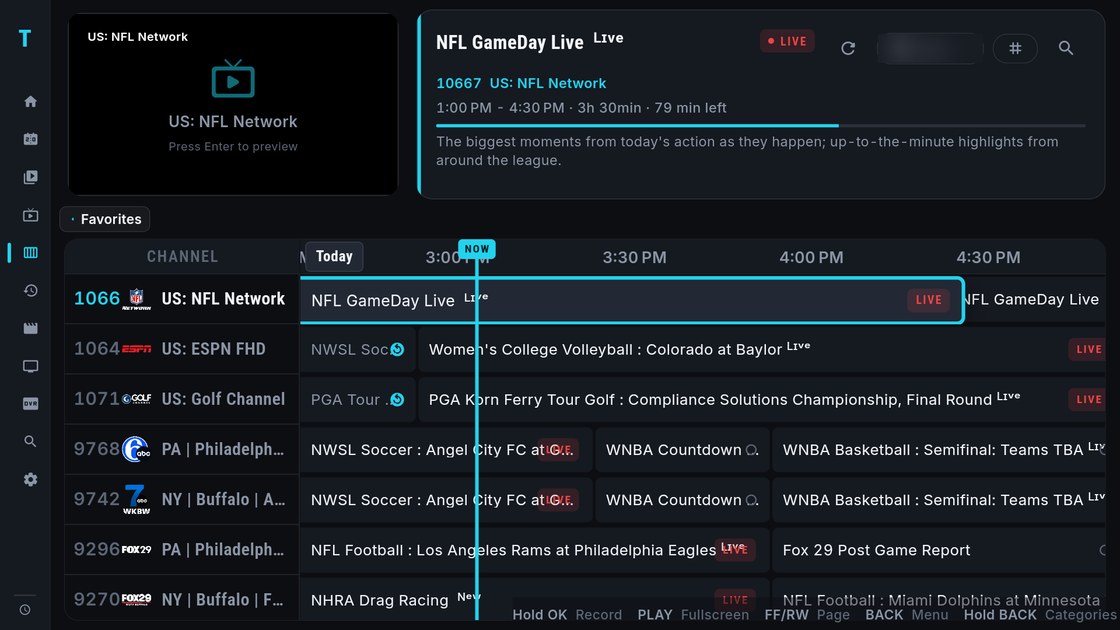
- Wait for the first sync. The Status tab shows the playlist and the guide filling in. For most providers the guide comes from TIVRA, so it is a small download.
New to provider logins? Start with Xtream Codes vs M3U or the M3U setup guide.
Updating, and fixing a failed install
From 3.4 on, TIVRA tells you when a newer version is available. To update yourself: Settings › About › Check for updates, then Install and Open. Installing over your current version keeps your account and settings.
If the installer never appears, the Fire TV is blocking installs from TIVRA itself: go back to Developer options › Install unknown apps and turn on TIVRA as well as Downloader.
"App not installed" on a Fire TV Stick almost always means low storage. The installer needs room for the download plus the unpacked app, so a Stick can fail even when it shows a few hundred MB free. Uninstall apps you don't use, clear the cache of large apps under Settings › Applications › Manage installed applications, delete old files from Downloader, then try again. The upgrade guide has the full troubleshooting table.
The Fire TV remote in TIVRA
- Rewind and fast-forward page a whole screen at a time in long lists: channels, the guide and search results.
- Tap RIGHT while watching flips back to the previous channel; hold RIGHT opens your last 10 channels.
- Hold OK on a channel opens Favorite, Record and Multi-View.
- Hold DOWN while a game plays opens the scores overlay; see the Sports Hub guide.
More in remote shortcuts.
Frequently asked questions
Is TIVRA in the Amazon Appstore?
TIVRA is installed on Fire TV from tivratv.com using the Downloader app from the Amazon Appstore. Enter the code 3059562 in Downloader.
Why can't I find Developer options on my Fire TV?
It is hidden until you open Settings, My Fire TV, About and press the device name seven times. Then Developer options, Install unknown apps lets you turn on Downloader.
Why does my Fire TV Stick say "App not installed"?
Usually not enough free storage for the download plus the unpacked app. Remove unused apps, clear large app caches and old downloads, then install again.
Is there a free trial?
Yes. Every plan starts with a 7-day free trial with no card required. Plans start from $2.49 a month, and a one-time Lifetime licence is available.
Put TIVRA on your Fire TV
7-day free trial, no card required. Open Downloader, enter 3059562, and add your own provider from your phone.
Start Free Trial Get it on Google Play