Best IPTV Player for Android TV, Google TV & Fire TV (2026)
If you own a Chromecast with Google TV, an Nvidia Shield, an Onn box, a Fire TV Stick or any Android TV device, you already have the right hardware for IPTV. What's left is choosing the IPTV player: the app that turns your subscription, or your free M3U playlists, into a smooth, remote-friendly living-room experience. This guide compares six players for 2026 and explains what actually matters when you're navigating with a D-pad from ten feet away.
Quick disclosure: this is published on the TIVRA blog, so we have a horse in this race. We've kept the comparison factual, the other apps here are genuinely good, and we say where they win.
First: a player is not a provider
Every app in this article is a bring-your-own-provider player. None of them supply channels or content. They play the streams from an IPTV service you already subscribe to, or from free legal sources, and you connect that service with one of two methods: an Xtream Codes login or an M3U playlist URL. If you're brand new to all this, start with What is IPTV? and come back.
Looking for content to test with? Our roundup of free legal M3U playlists gives you real streams (NASA TV, public broadcasters, FAST channels) to try any player before you commit.
What makes a good IPTV player on a TV
All six apps play video. The differences that matter in daily use are:
- Playback speed and stability. How fast does a channel load when you press a number, and does it hold a stable picture without stutter?
- D-pad navigation. Every screen has to work with a remote. Bad focus handling is the number-one reason people abandon an IPTV app.
- EPG (program guide). A real, scrollable now/next grid you can tune from, not just a list of channel names.
- Live controls. Can you pause, rewind and catch up on live TV?
- Recording / DVR. Can you save a program to a USB drive or NAS, and schedule it from the guide?
- Sports. Can the app tell you what's on right now and which of your channels carries it, or do you hunt through 200 sports channels by hand?
- Setup friction. Typing a long provider URL with an on-screen keyboard is miserable. The best apps have a way around it.
The six contenders in 2026
TiviMate
The long-standing favourite. TiviMate has a mature, information-dense interface, a battle-tested EPG, and premium features including catch-up, timeshift and recording. It runs on phones and tablets too. If you're a power user who wants deep customisation and a large community, it's a safe pick. The trade-offs: the UI is utilitarian, premium is a subscription, and there's no web-based setup, so you're typing URLs on the TV. Full breakdown: TIVRA vs TiviMate.
IPTV Smarters Pro
The most widely installed IPTV player, largely because many providers bundle it. It supports Xtream and M3U, has VOD and series browsing, and works across platforms. It's functional and free, but the interface feels dated, some builds show ads, and the experience varies depending on which rebranded version your provider ships. See our TIVRA vs IPTV Smarters Pro comparison.
Televizo
A clean, fast, no-nonsense player that's earned a following for doing the basics very well: quick channel switching, a tidy EPG, sensible remote handling. It's the pick if you want something simpler than TiviMate and nicer than Smarters. What it lacks is the deeper layer: no DVR to speak of, no sports features, no remote setup.
OTT Navigator
The tinkerer's choice. OTT Navigator exposes an enormous number of settings, supports catch-up and recording, and can be shaped into almost anything. The cost is that it takes an evening to configure, and the interface never quite feels TV-native. Great if you enjoy the process; frustrating if you just want to watch.
Kodi
Not an IPTV player so much as a media centre that can become one with the PVR IPTV Simple add-on. If you already live in Kodi for local media, adding your playlist there is sensible. If you don't, it's the most work of any option here, and the D-pad experience depends entirely on the skin you install.
TIVRA
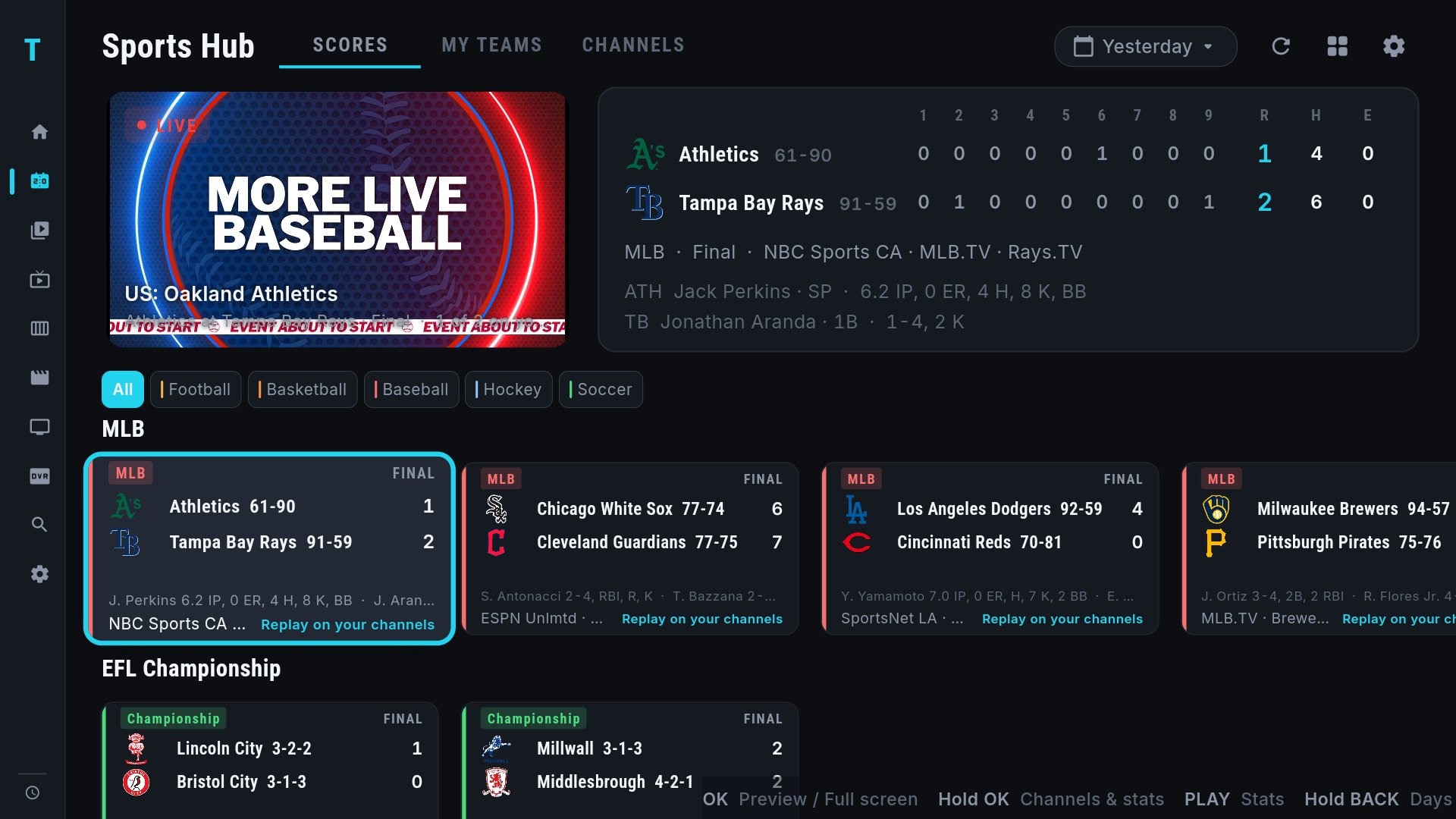
The TV-first player built around one idea: sharp, fast live TV. Channels load quickly, the interface is designed for the 10-foot view, and it ships the features that used to be TiviMate's premium territory as standard: pause and rewind live TV, DVR recording to USB or NAS, and scheduled recordings from the guide. Two things nothing else here does: a web dashboard that lets you set up your TV from your phone's browser, with no URL-typing on the remote, and a Sports Hub that shows live scores for 42 leagues and matches each game to the channels in your own provider, with Multi-View for up to four games on one screen. It also syncs watch history with Trakt and can sit your Jellyfin, Emby or NAS library next to live TV. It's on Google Play for Android TV, Google TV, phones and tablets, and a direct download for Fire TV. Paid after a free trial, and the newest of the six, so the community is the smallest.
Side-by-side comparison
| Feature | TIVRA | TiviMate | IPTV Smarters Pro | Televizo | OTT Navigator | Kodi |
|---|---|---|---|---|---|---|
| Xtream Codes + M3U | Yes | Yes | Yes | Yes | Yes | M3U (add-on) |
| EPG program guide | Full grid, tune from guide | Full grid | Basic grid | Full grid | Full grid | Grid (add-on) |
| Pause / rewind live TV | Yes | Yes (premium) | Limited | Limited | Yes | Provider-dependent |
| DVR recording (USB / NAS) | Yes (USB & SMB) | Yes (premium) | Limited | No | Yes | Yes (add-on) |
| Schedule recordings from EPG | Yes | Yes (premium) | No | No | Yes | Yes (add-on) |
| Live sports scores matched to your channels | Yes, 42 leagues | No | No | No | No | No |
| Multi-View (several channels at once) | Yes, up to 4 | No | Yes (premium builds) | No | Yes | No |
| Web dashboard (set up from your phone) | Yes | No | No | No | No | No |
| Trakt.tv sync | Yes | No | No | No | No | Yes (add-on) |
| Local library (Jellyfin / Emby / NAS) | Yes | No | No | No | No | Yes, natively |
| Cross-provider search | Yes | Partial | No | No | Partial | No |
| D-pad / remote navigation | TV-first | Full | Full | Full | Full, dense | Skin-dependent |
| Ads | None, any tier | None (premium) | Some builds | None (premium) | None (premium) | None |
| Google Play listing | Yes (TV + phone) | Yes | Yes | Yes | Yes | Yes |
| Fire TV | Sideload | Sideload | Sideload | Sideload | Sideload | Sideload |
| Pricing | Free trial, then $9.99/yr, $19.99/yr family, or $29.99 once | Free tier + premium subscription | Free / one-time | Free + premium | Free + premium subscription | Free |
Feature availability in other apps depends on version and tier; check the current build before you buy. Last checked September 2026.
Sports: the newest dividing line
For years every IPTV player treated sports the same way: a folder of a few hundred channels named after networks, and you on your own to work out which one has the game. That's changed. TIVRA's Sports Hub pulls live scores and schedules for 42 leagues, from the NFL, NBA, MLB and NHL through the Premier League, Champions League, La Liga, Serie A, cricket, rugby, the AFL and college football, and matches every game to the channels in your provider by rights-holder and region. Hold OK on a game and you get the channel list and a box score; pick a saved Multi-View and four games share the screen. None of the other five do any of this, so if sport is the reason you have IPTV, it's the deciding feature.
Which should you choose?
Choose TiviMate if you're a power user who wants the deepest customisation and the biggest community, and you don't mind a subscription and a busier interface.
Choose IPTV Smarters Pro if your provider recommends it, you want something free, and you're not fussy about polish.
Choose Televizo if you want the simplest clean player and don't need recording or sports.
Choose OTT Navigator or Kodi if configuring things is part of the fun for you, or you already run Kodi for your local media.
Choose TIVRA if you want the fastest, cleanest living-room experience with pause-live-TV, DVR and sports scores built in, you'd rather set your TV up from your phone than type URLs with a remote, and you like the idea of a one-time Lifetime licence instead of a subscription.
Installing on Android TV, Google TV and Fire TV
Android TV and Google TV
- Open the Play Store on the TV and install the player. TIVRA is on Google Play for TV, phones and tablets.
- Add your provider with an Xtream login or M3U URL. With TIVRA you do this from the web dashboard on your phone instead of typing on the TV.
- Point it at an EPG source so the guide fills in.
- Learn a few remote shortcuts and you're done.
Fire TV Stick and Fire TV Cube
Fire TV has no Play Store, so every player on this list is sideloaded. Install the free Downloader app from Amazon's store, allow it to install unknown apps in Settings, then enter the app's code or URL. TIVRA's Downloader code is 3059562. Sideloaded apps update themselves the same way, and the Fire TV remote works with all six players.
Frequently asked questions
What is the best IPTV player for Android TV?
For most people in 2026 it comes down to TiviMate or TIVRA. TiviMate has the deepest customisation and the largest community. TIVRA is faster to set up, includes pause-live-TV, DVR and sports scores without a premium tier, and adds Multi-View. IPTV Smarters Pro is the free, provider-bundled option.
Do IPTV players come with channels?
No. Every app in this guide is a bring-your-own-provider player. You connect a service you already subscribe to, or free legal M3U playlists, with an Xtream Codes login or an M3U URL. The player supplies the guide, playback and recording, not the content.
Which IPTV player works on a Fire TV Stick?
All six. Fire TV has no Play Store, so you sideload the APK with the Downloader app. TIVRA's Downloader code is 3059562.
Which IPTV player is best for sports?
TIVRA is the only player here with a Sports Hub: live scores for 42 leagues matched to the channels in your own provider, a box score on any remote, and Multi-View for four live games in one press, or up to eight screens in a saved view. The others show sports channels like any other channel.
Is TIVRA on the Google Play Store?
Yes, for Android TV, Google TV, phones and tablets, and as a direct APK download for Fire TV and other boxes. Both install paths get the same updates.
Try TIVRA on your Android TV, Google TV or Fire TV
Free trial, no card required. Set it up from your phone in minutes with the web dashboard.
Start Free Trial Get it on Google Play