TiviMate Alternatives (2026): 7 IPTV Players That Do More
TiviMate is a very good IPTV player, and most people searching for an alternative aren't leaving because it's bad. They're leaving because of one specific thing: the premium subscription, the spreadsheet interface, typing URLs on a TV keyboard, wanting to record without paying monthly, or wanting help finding the game. This guide is organised around those reasons. Find yours, and the right alternative follows.
Disclosure: TIVRA is our app. It's listed first because it addresses the most common reasons people leave TiviMate, but the other six are real options and we say plainly where they beat us. See our full TIVRA vs TiviMate comparison for the feature-by-feature version.
Why people look for a TiviMate alternative
From the questions we get and the threads we read, it's almost always one of these:
- The subscription. Recording, catch-up, multiple playlists and most of the good parts sit behind TiviMate Premium, billed yearly. People with a one-time-purchase mindset resent it.
- The interface. Dense, grey and information-heavy. Powerful, but it looks like 2019 next to newer players, and family members often find it intimidating.
- Setup on the TV. There's no way to add a provider from your phone. Every URL, username and password gets typed with the on-screen keyboard.
- Sports. TiviMate shows sports channels as channels. If you want to know which of your 300 sports channels has the game, you're on your own.
- Phones and tablets. TiviMate's mobile app exists but is a separate, more limited experience, and there's no shared account between TV and phone.
- Local media. If you keep movies on a NAS or a Jellyfin server, TiviMate doesn't see them.
Each alternative below is tagged with which of these it fixes, and which it doesn't.
Whichever you choose, every player here is a bring-your-own-provider app. Your existing M3U or Xtream Codes details work in all of them; see how to switch below.
1. TIVRA
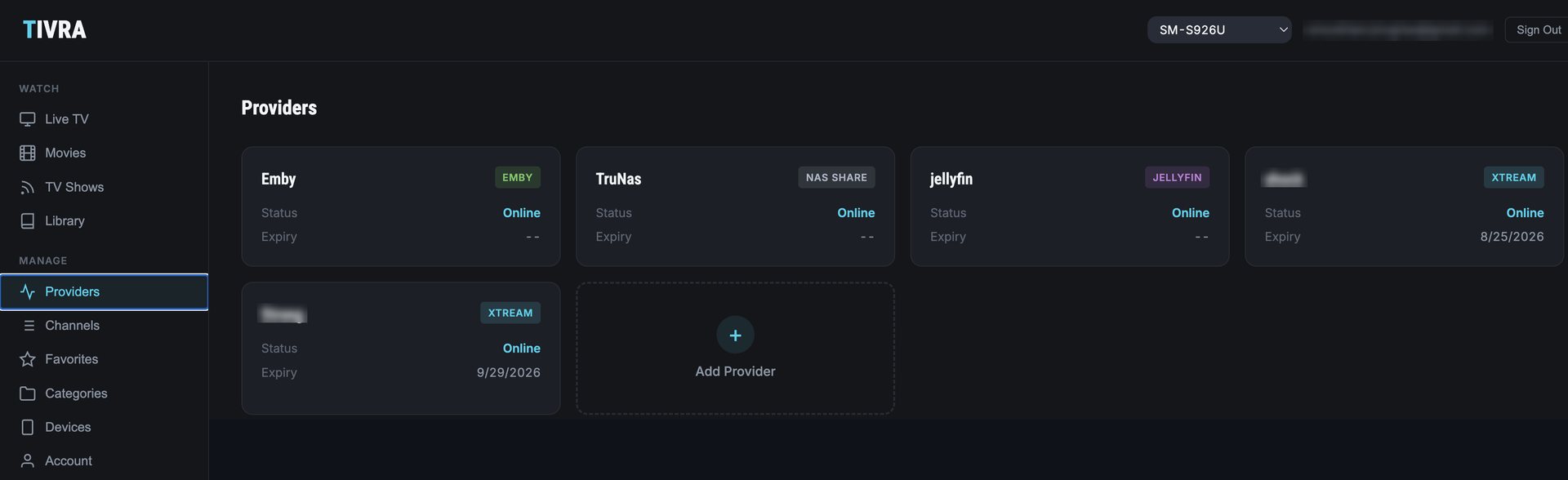
Fixes: subscription, interface, setup, sports, phones, local mediaTIVRA was built for the people on this page. The features TiviMate charges for, pause and rewind live TV, DVR to USB or NAS, and scheduled recordings from the guide, come with every plan, and there's a one-time Lifetime licence for anyone done with subscriptions. The interface is TV-first and clean enough that a partner or a parent can use it without a tutorial. Setup happens on the web dashboard from your phone's browser: add providers, pick favourites, arrange the home screen, then it all appears on the TV. The Sports Hub shows live scores for 42 leagues and matches every game to the channels your provider carries, and Multi-View puts four games on one screen. It runs on Android TV, Google TV, Fire TV, phones and tablets from one account, and can sit your Jellyfin, Emby or NAS library beside live TV.
Where TiviMate still wins: the sheer number of layout and behaviour settings, and a community many times larger. If you've spent months tuning TiviMate exactly to your taste, expect fewer knobs here.
- Pause, rewind and DVR on every plan, Lifetime option
- Set up from your phone, no TV typing
- Sports Hub with scores matched to your channels, Multi-View
- Same account on TV, phone and tablet
- Paid after the trial
- Fewer customisation settings than TiviMate
- Smaller community
2. Televizo
Fixes: interface. Keeps: subscription, TV-only setupIf your complaint is only that TiviMate looks cluttered, Televizo is the calmest option. Fast channel switching, a clear EPG, sensible remote handling, nothing to configure. The premium tier is also a subscription, though, and there's no recording, no sports tooling, and setup is still on the TV. Best for someone who wants less, not more.
- Clean and quick
- Good EPG out of the box
- Light on older sticks
- No DVR
- Premium is a subscription
- Setup on the TV keyboard
3. OTT Navigator
Fixes: some paywalled features. Keeps: dense interface, subscriptionOTT Navigator is where TiviMate power users go when they want even more settings. Recording, catch-up, multi-view and picture-in-picture are all in there, and the free tier is generous. The interface is busier than TiviMate's, not calmer, and premium is again a subscription. Pick it if you left TiviMate for lack of control, not for excess of it.
- More features than TiviMate, including multi-view
- Generous free tier
- Copes with unusual playlists
- Even denser interface
- Long setup
- Premium is a subscription
4. IPTV Smarters Pro
Fixes: subscription (it's free). Keeps: dated interface, limited DVRThe free option, and the one many providers hand out. Live, movies and series sections, Xtream and M3U support, and versions for nearly every platform including iOS. It's the least demanding switch from TiviMate if cost is the only issue, but expect a more basic guide, no real recording, ads in some builds, and a feature set that varies between rebranded versions. Our TIVRA vs IPTV Smarters Pro comparison has the details.
- Free
- Runs on almost everything
- Your provider probably supports it
- Dated interface, ads in some builds
- Basic guide, limited pause and recording
- Inconsistent between builds
5. Sparkle TV
Fixes: interface. Keeps: TV-only setup, no DVRA newer player with a modern, glassy look and smooth navigation, the closest thing to "TiviMate but pretty". It handles the core live and on-demand experience well and is priced reasonably. It doesn't go deep: no recording, no sports features, and setup is on the TV. Worth a look if the interface is your whole objection and you don't record.
- Modern interface
- Easy on a remote
- Reasonable price
- No DVR or sports tooling
- Fewer settings
- Small community
6. IPTV Extreme
Fixes: subscription (one-time Pro). Keeps: dated interfaceAn older player with a one-time Pro purchase, recording and timers, and fine-grained control over multiple playlists. It looks its age and the menus are busy on a remote, but it is stable and well maintained. The pick if you want a one-time price and don't care about looks.
- One-time Pro purchase
- Recording and timers
- Many playlists and EPG sources
- Dated interface
- Busy menus
- No sports or multi-view
7. Kodi with PVR IPTV Simple
Fixes: subscription, local media. Keeps: setup effortFree, open source, and the only option here that natively lives alongside a full local media library. Add the PVR IPTV Simple client, point it at your playlist and EPG, and you get a guide, timers and recording. The cost is effort: it's the most setup of anything on this list, and the remote experience depends on the skin. Sensible if you already run Kodi; a project if you don't.
- Free
- Live TV next to your own media
- Endless add-ons
- Most setup effort
- Skin-dependent remote experience
- Xtream logins need conversion
Alternatives vs TiviMate at a glance
| App | Price model | DVR | Setup from phone | Sports scores | Multi-View | Phone + TV, one account | Local media |
|---|---|---|---|---|---|---|---|
| TiviMate | Subscription | Premium | No | No | No | No | No |
| TIVRA | Yearly or one-time Lifetime | Yes, USB & NAS | Yes | Yes, 42 leagues | Up to 4 | Yes | Jellyfin, Emby, NAS |
| Televizo | Subscription | No | No | No | No | No | No |
| OTT Navigator | Subscription | Yes | No | No | Yes | No | No |
| IPTV Smarters Pro | Free | Limited | No | No | Some builds | No | No |
| Sparkle TV | Free + premium | No | No | No | No | No | No |
| IPTV Extreme | One-time Pro | Yes | No | No | No | No | No |
| Kodi | Free | Yes (add-on) | No | No | No | No | Yes, natively |
Other apps' features depend on version and tier and change often; check the current build before you pay. Last checked September 2026.
How to switch from TiviMate
Nothing about your channels lives inside TiviMate. It lives with your provider, so switching is re-entering three things:
- Your provider details. The same M3U URL, or the same Xtream Codes server, username and password. In TiviMate they're under Settings › Playlists if you need to read them off. See Xtream Codes vs M3U if you're unsure which you have.
- Your EPG source. Usually your provider's XMLTV URL, or the same public source. Our EPG sources guide lists the good ones.
- Favourites and layout. These don't transfer between apps. In TIVRA you rebuild them on the web dashboard from your phone in a few minutes, and they sync to every TV on the account.
Run both apps side by side for a week before uninstalling anything. A free trial costs nothing, and the question that matters, which one feels better on your remote, only gets answered on your sofa.
Frequently asked questions
Is there a free alternative to TiviMate?
IPTV Smarters Pro and Kodi are free. OTT Navigator and Televizo have generous free tiers with premium unlocks. TIVRA has a free trial and then a paid plan, with a one-time Lifetime option.
What is the best TiviMate alternative for Fire TV Stick?
All seven sideload onto Fire TV with the Downloader app. On a basic stick, lighter players like Televizo and TIVRA feel quicker than TiviMate; OTT Navigator suits a Cube or 4K Max better.
Is there a TiviMate alternative with a one-time price?
Yes. TIVRA's Lifetime licence and IPTV Extreme Pro are one-time purchases. TiviMate, OTT Navigator and Televizo premium are subscriptions.
Can I move my TiviMate playlist to another app?
Your provider details are what matter, not TiviMate's files. Add the same M3U URL or Xtream login and the same EPG source to the new app and your channels and guide come back. Favourites and settings don't transfer; TIVRA's dashboard makes rebuilding them quick.
Which TiviMate alternative is best for sports?
TIVRA. The Sports Hub shows live scores for 42 leagues matched to the channels in your provider, and Multi-View shows up to four games at once. The others treat sports channels like any other channel.
Try TIVRA next to TiviMate
Free trial, no card required. Add your provider from your phone and compare on your own remote.
Start Free Trial Get it on Google Play