Best IPTV Apps for Sports (2026): Scores, Multi-View and Finding the Game
Watching sports through IPTV has a problem that movies and regular channels don't. A provider gives you a few hundred sports channels named after networks, regional feeds and events, and on Sunday afternoon you're scrolling through them trying to work out which one has your game. Most IPTV players don't help at all. This guide ranks the apps that do, and is honest about the ones that don't, judged on the things that matter on game day.
Disclosure: TIVRA is our app, and sports is the thing we built it around, so it comes first here. The rest of the list is graded on the same criteria, and where an app has no sports features we say so instead of inventing some.
None of these apps carry games. They play the channels from a provider you already have, connected with an Xtream Codes login or M3U URL. Whether a game is available depends on your provider; what the app does is help you find it, watch it and follow it.
What a sports fan needs from an IPTV app
- Finding the game. Can the app tell you which of your channels is showing Eagles at Cowboys right now, or do you hunt through "US: NFL 04 HD", "CBS East" and "FOX Sports 1" by hand?
- Scores and schedules. A list of today's games with live scores, so you know what's on before you tune in.
- Multi-view. Several games on one screen, with control over which one you hear.
- Pause, rewind and catch-up. You missed the touchdown because someone rang the doorbell.
- Game-day reliability. Fast channel switching, sensible handling of provider connection limits, and a way to jump to another feed when one dies at the worst moment.
- Spoiler control. If you watch games later, scores need to stay hidden until you say so.
1. TIVRA
Best overall for sportsTIVRA is the only IPTV player with a real sports layer. The Sports Hub lists today's games for 42 leagues with live scores, and for each game it checks all of your providers three ways: the guide data, channel names that read like the matchup ("Lions @ Bears"), and the broadcaster's name. Cards that say "On your channels" are games it found; hold OK on any card to see every channel carrying it, across every provider, and pick one. Press Play or hold OK for the box score, player stats and standings, updating while the game is on. Multi-View opens up to four live games at once from a single press, or a saved view of two to eight screens you build once ("NFL Sunday": RedZone plus three games) and reopen every week. Follow your teams for their own rows. Turn on Hide scores and nothing is spoiled until you press OK. Pause and rewind live TV, and DVR to USB or NAS, are on every plan.
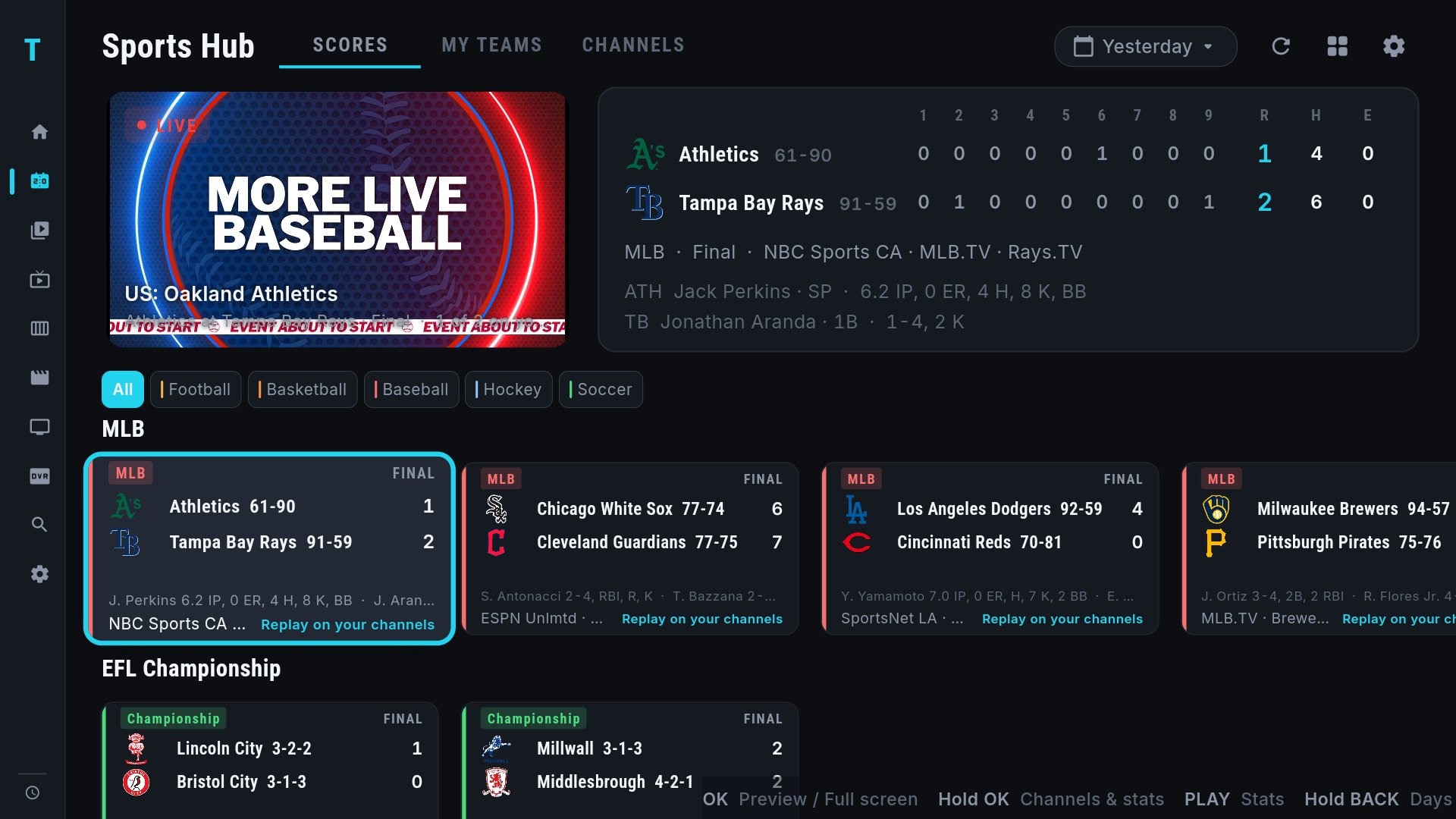
- Live scores for 42 leagues, games matched to your own channels
- Multi-View: four live games in one press, saved views up to eight screens
- Box score, stats and standings on any remote
- Hide-scores mode, My Teams, pause and rewind
- Paid after the trial
- Matching depends on your provider's channel names and guide; some feeds need a manual pick
- No fewer than two provider connections needed for a full four-screen view
2. TiviMate
Best traditional player for sportsTiviMate has no scores, no game list and no multi-view, but it is an excellent conventional player, and for sports that still counts for a lot: fast channel switching, a dense EPG that shows what every sports channel is carrying, catch-up and recording with premium, and favourites groups you can build for each sport. If your provider's guide data is good, TiviMate's EPG is a fine way to find the game. If it isn't, you're back to scrolling.
- Fast switching, strong EPG
- Catch-up and recording (premium)
- Favourites groups per sport
- No scores, schedules or game matching
- No multi-view
- Premium is a subscription
3. OTT Navigator
Best for multi-view without a sports layerOTT Navigator can show several channels at once and supports recording and catch-up, which makes it the strongest sports option among the conventional players. It still knows nothing about games or scores, so you pick every screen by hand from the channel list, and the interface is dense enough that building a multi-view on a Sunday takes a while. Worth it if you like configuring things.
- Multi-view and picture-in-picture
- Recording and catch-up
- Generous free tier
- No scores or game matching
- Every screen chosen by hand
- Dense interface
4. IPTV Smarters Pro
Best free optionSmarters plays your sports channels like any other channels. Some builds include a multi-screen mode, the guide is basic, and there's no help finding the game. It's free and your provider probably supports it, which is why it's here. See TIVRA vs IPTV Smarters Pro.
- Free
- Multi-screen in some builds
- Runs on nearly everything
- No scores or game matching
- Basic guide, limited pause
- Ads in some builds
5. Televizo
Best lightweight player for a Fire TV StickTelevizo is quick, clean and light, which matters on a basic Fire TV Stick during a busy game day. It has a good EPG and nothing else sports-specific: no scores, no multi-view, no recording. A fine player, not a sports app.
- Fast on low-end hardware
- Clear EPG
- Simple
- No scores, multi-view or DVR
- Setup on the TV keyboard
6. Kodi
Best if you already run KodiWith the PVR IPTV Simple client, Kodi gives you a guide, timers and recording for your playlist, and there are community add-ons that scrape scores and schedules if you're prepared to maintain them. It's the most work of anything here and the remote experience depends on the skin. Sensible for existing Kodi households only.
- Free and open source
- Recording and timers via the PVR add-on
- Add-ons for almost anything
- Most setup effort
- Sports features depend on third-party add-ons
- Skin-dependent remote handling
Comparison table
| App | Finds the game on your channels | Live scores & schedule | Multi-view | Pause / rewind | DVR | Hide scores |
|---|---|---|---|---|---|---|
| TIVRA | Yes, across all providers | Yes, 42 leagues, box scores | 4 live games in one press; saved views to 8 screens | Yes | USB & NAS | Yes |
| TiviMate | Via EPG only | No | No | Premium | Premium | No |
| OTT Navigator | Via EPG only | No | Yes, manual | Yes | Yes | No |
| IPTV Smarters Pro | No | No | Some builds, manual | Limited | Limited | No |
| Televizo | Via EPG only | No | No | Limited | No | No |
| Kodi | Via EPG only | Add-ons | No | Depends | Add-on | No |
Other apps' features depend on version and tier; check the current build. Last checked September 2026.
By league
How TIVRA handles the leagues people ask about most, including which networks carry the games and what to expect from your provider:
- NFL on IPTV: CBS, FOX, NBC, ESPN, NFL Network and RedZone
- NBA on IPTV: national and regional networks, League Pass games
- MLB on IPTV: 162 games and the regional network problem
- NHL on IPTV: national, regional and Canadian feeds
- Premier League on IPTV: Sky, TNT, NBC and the 3pm games
- Champions League on IPTV: every match, every Tuesday and Wednesday
Two how-tos cover the mechanics: how to watch four games at once on Android TV or Fire TV, and how to find which channel a game is on.
Frequently asked questions
What is the best IPTV app for sports?
TIVRA, because it is the only IPTV player with a sports layer: live scores and schedules for 42 leagues, every game matched to the channels in your own providers, box scores on any remote, and Multi-View for several games at once. Conventional players like TiviMate and OTT Navigator are good at playing sports channels but know nothing about games.
Can I watch multiple games at once with IPTV?
Yes, with a player that supports multi-view. TIVRA opens up to four live games in one press and saved views of two to eight screens; OTT Navigator and some IPTV Smarters builds offer manual multi-screen. Your provider's connection limit sets how many streams you can run at once.
How do I find which channel a game is on?
In TIVRA, open the Sports Hub: each game card shows the channel it was found on, and holding OK lists every channel carrying that game across all your providers. In other players you check the EPG for each sports channel, or look for an event channel named after the matchup.
Does an IPTV app show live scores?
TIVRA does, for 42 leagues, with box scores, player stats and standings that refresh during the game. Other IPTV players do not show scores.
Which IPTV app is best for NFL Sunday?
TIVRA, with a saved Multi-View of NFL RedZone plus three games opened in one press, and the NFL row showing every game with scores. See our NFL on IPTV guide for the networks and setup.
Try the Sports Hub on your own channels
Free trial, no card required. Add your provider from your phone and see today's games matched to your channels.
Start Free Trial Get it on Google Play