How to Find Which Channel a Game Is On with IPTV
Every IPTV sports fan knows the ritual. The game starts in two minutes, the provider has 300 sports channels, and the one you need is called something like "US: FOX Sports 1 HD", or "NFL 04", or "Lions @ Bears", or nothing helpful at all. This guide explains where a game actually lives in an IPTV lineup, how to find it fast in any player, and how TIVRA does the search for you across every provider you own.
The three places a game hides
Providers build sports lineups in three different ways, often all at once, and each needs a different search.
- The broadcaster's channel. The game is on CBS, ESPN, Sky Sports Main Event, or a regional network, and the provider carries that network under its own name, sometimes with a region prefix: "US: ESPN", "UK: Sky Sports Main Event". You need to know who's broadcasting the game.
- Guide data. The channel's EPG says "NFL Football: Eagles at Cowboys" for the next three hours. Good providers with good guide data make this easy; many sports feeds, especially event channels, have no guide data at all.
- Event channels named after the matchup. Dozens of channels named "NFL 01" to "NFL 16", or renamed on the day to "Eagles @ Cowboys (CBS)", which carry no guide data and change names every week. These are the ones that hide.
Finding it by hand in any IPTV player
- Know the broadcaster. The league's schedule page or a sports site lists the network for each game. Our league guides cover the usual suspects for the NFL, NBA, MLB, NHL, Premier League and Champions League.
- Search the channel list for the network. Most players have a search box; type "ESPN" or "Sky Main". Check the region prefix matches the game's broadcast.
- Check the guide. Open the EPG for the sports category and scan the current-hour column for the team names.
- Scan the event channels. Look for a group named after the sport or league ("NFL", "PPV", "Events") and read the channel names. If they're numbered rather than named, tune each until you find the game.
- Keep a favourites group per sport so next week starts from a shortlist.
This works, and on a good provider it takes a minute. On a busy Sunday across two providers it takes five, and you'll do it again for the late game.
Letting TIVRA find it
TIVRA's Sports Hub does the same three searches automatically, for every game on today's schedule, across all of your providers, not just the one you're connected to. For each game it checks, in order:
- Guide data: any channel whose EPG says the game is on now ranks first.
- Channel names that read like the game: "Lions @ Bears", "Eagles vs Cowboys", team nicknames and abbreviations. These match with no guide data at all.
- The broadcaster: the network listed for the game, found on your providers by name, including the regional and international variants.
Ties go your way: the provider you're connected to is preferred, HD beats SD, and a channel you picked yourself for that game always wins. On the Sports Hub, a card that says On your channels is a game TIVRA found. Press OK to preview it, OK again for full screen.
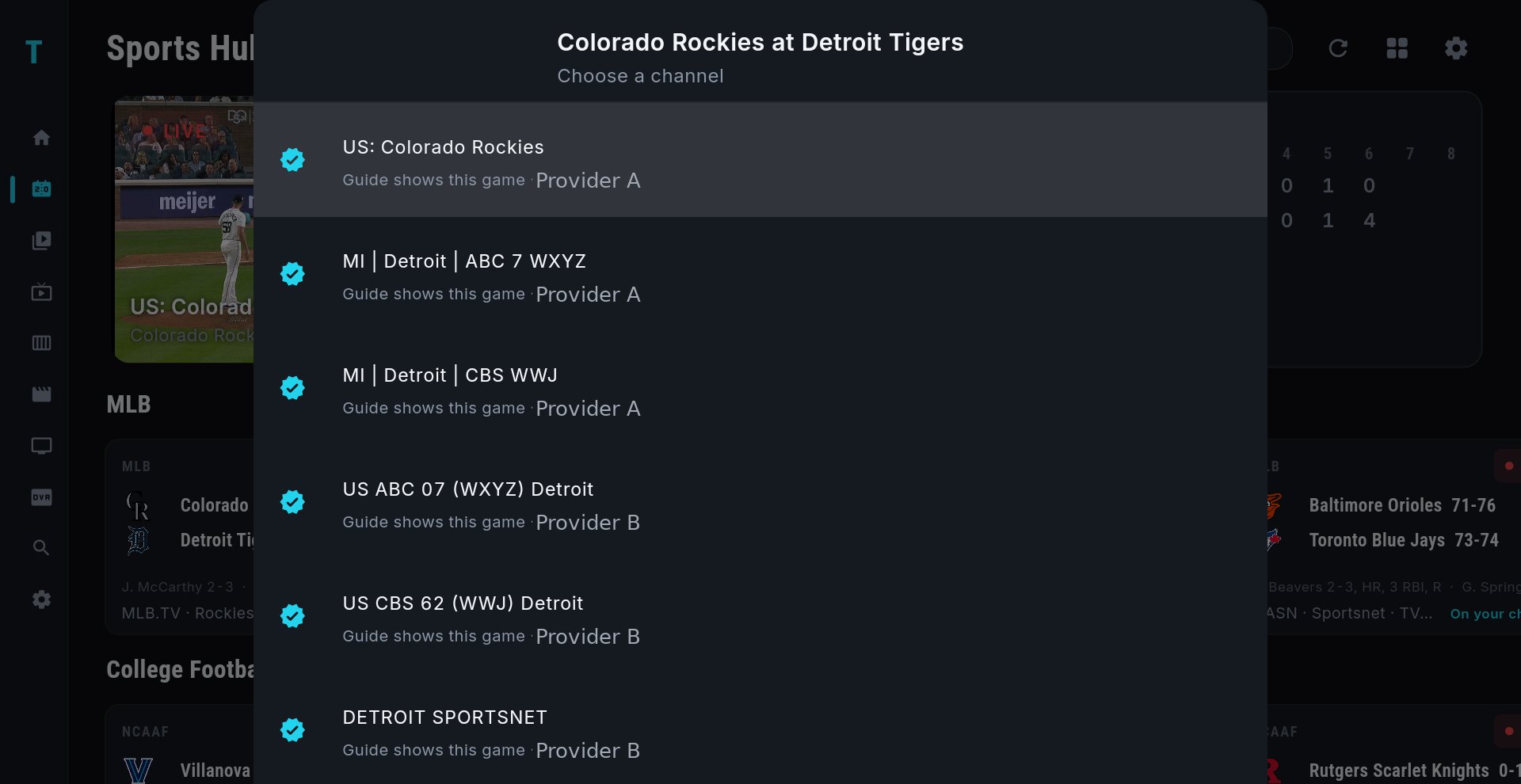
Hold OK on any game card to see the full list: every channel carrying that game, which provider each is on, and why it matched. Pick one and TIVRA remembers your choice for the rest of the game. The same sheet opens even when nothing matched, so the box score is always one hold away.
When the game isn't found
- Your provider doesn't carry the broadcaster. Regional networks and some international rights are the usual gap. Hold OK to confirm the list is empty, then check the league guide for which network has the game.
- The event channel's name doesn't match. Providers invent naming patterns. If yours uses one TIVRA doesn't recognise, tell us the shape of the name on Discord (no provider names needed) and it gets added to the matcher.
- The guide data is wrong. Some EPG sources lag or mislabel. Point TIVRA at a better EPG source; the game-name and broadcaster searches still work without it.
- The feed is dead. The channel matched but plays nothing. Hold OK and pick the next channel in the list; your pick is remembered for the rest of the game.
Frequently asked questions
How do I find which IPTV channel is showing a game?
Find the broadcaster from the league schedule, search your channel list for that network with the right region prefix, check the guide for the team names, and scan any event channels named after the league. TIVRA's Sports Hub does all three searches automatically for every game on today's schedule, across all of your providers.
Why do my IPTV sports channels have no guide data?
Event channels that change content daily are rarely covered by EPG sources, so the guide is blank. Their names, often the matchup itself, are the only clue, which is why TIVRA matches games by channel name as well as by guide data.
What does "On your channels" mean in TIVRA?
TIVRA found at least one channel across your providers that is carrying that game. Hold OK on the card to see every match and pick one.
Can TIVRA search more than one provider?
Yes. Every game is checked against all of your providers, not just the one you are connected to, and the channel list shows which provider each match is on.
See today's games matched to your channels
Free trial, no card required. Add your provider from your phone and open the Sports Hub.
Start Free Trial Get it on Google Play