Best IPTV Apps for Android TV & Fire TV (2026): 8 Players Compared
An IPTV app is the player you put between your provider and your TV. The provider gives you a playlist or a login; the app gives you the guide, the remote-friendly interface, pause and rewind, recording, and everything else that decides whether living-room IPTV feels like cable or like a chore. This is a roundup of the eight players worth installing on an Android TV, Google TV or Fire TV Stick in 2026, judged the way you'll use them: from the couch, with a remote.
Disclosure: TIVRA is our app, so read our entry with that in mind. The other seven are real competitors with real strengths, and we've tried to describe each one the way its own fans would.
None of these apps include channels. They're all bring-your-own-provider players. If you're new to this, start with What is IPTV?, then Xtream Codes vs M3U for how a provider connects. To test any player without a subscription, use free legal M3U playlists.
What we judged on
- Remote navigation. Does every screen work with a D-pad, and how many presses does the common stuff take?
- Channel switching. How fast a channel loads and whether it holds a stable picture on a Fire TV Stick, not just a Shield.
- EPG. A real grid you can scroll and tune from, not a list of names.
- Live controls. Pause, rewind, catch-up.
- Recording. To USB or a NAS, scheduled from the guide.
- Sports. Whether the app helps you find the game or leaves you scrolling through 300 sports channels.
- Setup and price. How much typing on a TV keyboard, and what it costs to unlock the features that matter.
1. TiviMate
Best for power usersTiviMate is the app most people mean when they say "a proper IPTV player". It has been refined for years, the EPG is dense and fast, and almost everything about the layout can be changed. Catch-up, timeshift, recording, multiple playlists and profiles are all there once you pay for premium, which is a subscription. What it doesn't have is any help with setup, so you'll be typing provider URLs on the TV, and its interface looks like a spreadsheet next to the newer apps. If you like tinkering and want the largest community for answers, it's the safe choice. Our detailed TIVRA vs TiviMate comparison goes feature by feature.
- Deepest customisation of any player
- Mature, fast EPG
- Biggest user community
- Recording and catch-up need the premium subscription
- Dated, dense interface
- No remote setup from a phone
2. TIVRA
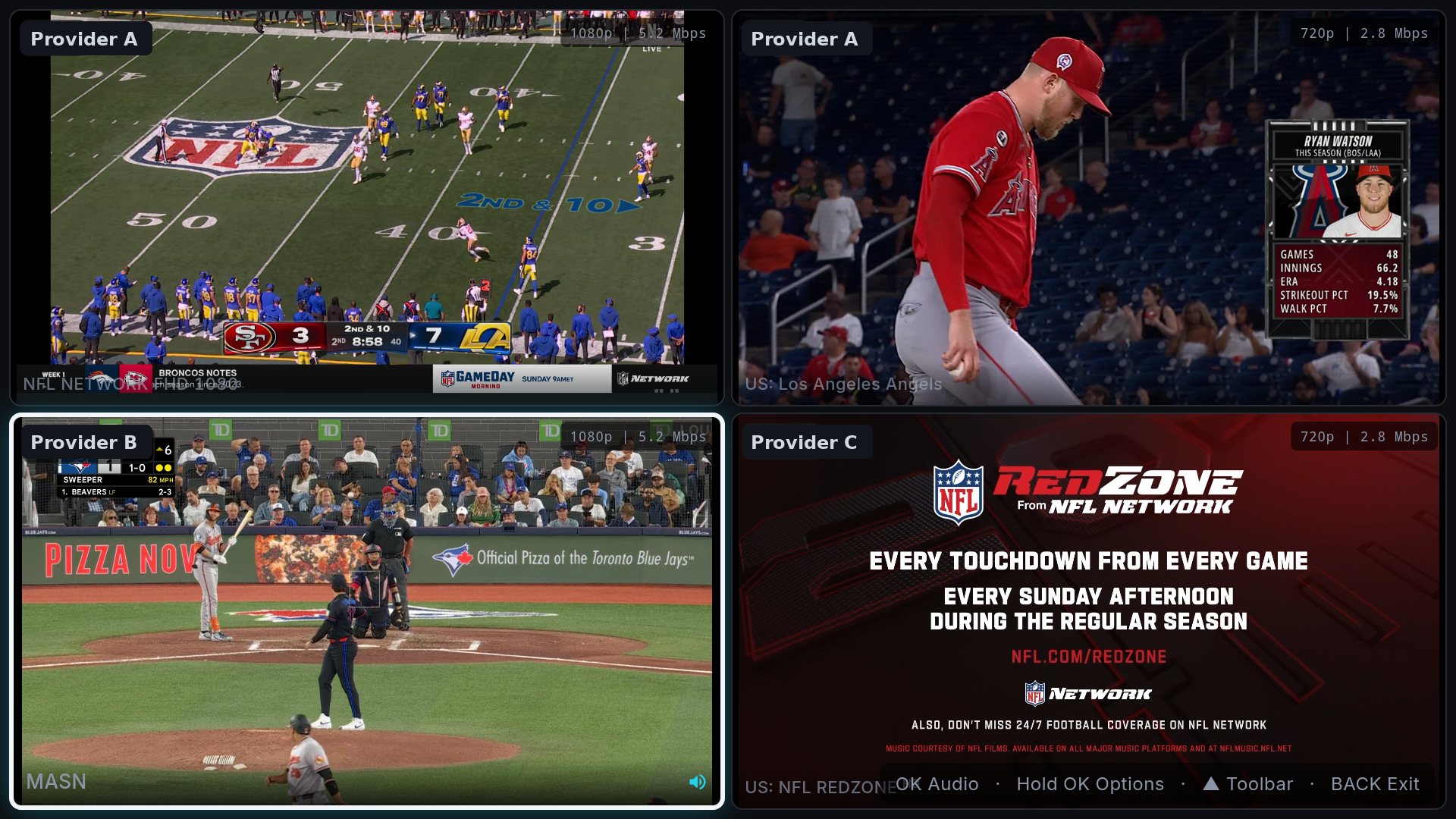
Best for sports and easy setupTIVRA is the TV-first player built around fast, sharp live TV. Channels load quickly, the interface is designed for the 10-foot view, and the features TiviMate charges for come as standard: pause and rewind live TV, DVR recording to USB or a NAS, and scheduled recordings from the guide. Two things nothing else on this list does: a web dashboard lets you set up the TV from your phone's browser with no URL typing on the remote, and the Sports Hub shows live scores for 42 leagues and matches every game to the channels in your own provider, with Multi-View for up to four games on one screen. It also syncs with Trakt and can put a Jellyfin, Emby or NAS library next to live TV. It's on Google Play for TV and phones, sideloadable on Fire TV, and paid after a free trial, with a one-time Lifetime option. Being the newest app here, its community is the smallest.
- Fast channel switching, clean TV interface
- Pause, rewind and DVR on every plan
- Sports Hub with scores matched to your channels, plus Multi-View
- Set up from your phone via the web dashboard
- Paid after the trial (though Lifetime is one-time)
- Smallest community of the eight
- Fewer deep customisation knobs than TiviMate or OTT Navigator
3. IPTV Smarters Pro
Best free option most providers supportSmarters is the player providers hand out, often as a rebranded build with the provider's own name on it. It supports Xtream Codes and M3U, has live, VOD and series sections, a basic guide, and runs on nearly everything including phones and iOS. It's free, and for many people that's the whole decision. The trade-offs are a dated interface, ads in some builds, features that vary by which version you have, and no real recording or live-pause story. Our TIVRA vs IPTV Smarters Pro comparison covers the details.
- Free, and your provider probably supports it
- Runs on Android, iOS, Fire TV and more
- Simple live / movies / series layout
- Dated interface, ads in some builds
- Limited pause and recording
- Quality varies between rebranded builds
4. Televizo
Best simple, fast playerTelevizo does the basics very well and little else. Channel switching is quick, the EPG is clear, the layout is uncluttered, and the remote handling is sensible without any setup. If you want something calmer than TiviMate and nicer than Smarters, and you don't care about recording or sports features, it's an easy recommendation. Premium removes the limits and ads.
- Clean, quick, easy to learn
- Good EPG and remote handling
- Light enough for older sticks
- No DVR to speak of
- No sports or multi-view features
- No remote setup
5. OTT Navigator
Best for tinkerersOTT Navigator has a setting for everything: layouts, EPG behaviour, catch-up, recording, picture-in-picture, multi-view, provider quirks. Configured well, it's one of the most capable players on Android. The catch is that configuring it well takes an evening, the menus are enormous, and the default interface never feels quite native to a TV. Great if you enjoy the process; wearing if you just want to watch the game.
- Enormous feature set, including recording and multi-view
- Handles unusual providers and playlists
- Free tier is generous
- Steep learning curve
- Dense, non-TV-native interface
- Premium is a subscription
6. Sparkle TV
Best modern look on a budgetSparkle is one of the newer players and it shows in a good way: a modern, glassy interface, a proper guide, and smooth navigation. It supports the usual playlist and Xtream logins and covers the core live and on-demand experience without much fuss. It's less deep than TiviMate and has none of the sports tooling, but if you mostly want a good-looking, easy player, it belongs on the shortlist.
- Modern interface, easy on a remote
- Solid EPG and playback
- Reasonable pricing
- Fewer advanced features
- No sports or multi-view
- Smaller community
7. IPTV Extreme
Best for many playlistsIPTV Extreme is an older, no-frills player with a loyal following among people who juggle several playlists and want granular control over how each behaves, including recording. The interface is plain and the learning curve is real, but it is stable, well maintained, and the Pro version is a one-time purchase. It's the choice if you value control and don't mind that it looks like it did five years ago.
- Handles many playlists and EPG sources
- Recording and timers
- One-time Pro purchase
- Plain, dated interface
- Busy menus on a remote
- No sports or multi-view
8. Kodi (with PVR IPTV Simple)
Best if you already run KodiKodi isn't an IPTV app; it's a media centre that becomes one when you add the PVR IPTV Simple client and point it at your playlist and EPG. If you already keep your movies and shows in Kodi, adding live TV there makes sense and gives you a full guide, timers and recording. If you don't, it's the most work of the eight, and how well it feels on a remote depends entirely on the skin you install.
- Free and open source
- Live TV alongside a full local media library
- Endless add-ons and skins
- Most setup effort of any option
- Remote experience depends on the skin
- Xtream logins need conversion or a third-party add-on
Comparison table
| App | EPG grid | Pause / rewind | DVR | Sports scores | Multi-View | Setup from phone | Price |
|---|---|---|---|---|---|---|---|
| TiviMate | Yes | Premium | Premium | No | No | No | Free + subscription |
| TIVRA | Yes, with preview | Yes | USB & NAS, scheduled | Yes, 42 leagues | Up to 4 | Yes, web dashboard | Trial, then from $9.99/yr or $29.99 once |
| IPTV Smarters Pro | Basic | Limited | Limited | No | Some builds | No | Free |
| Televizo | Yes | Limited | No | No | No | No | Free + premium |
| OTT Navigator | Yes | Yes | Yes | No | Yes | No | Free + subscription |
| Sparkle TV | Yes | Limited | No | No | No | No | Free + premium |
| IPTV Extreme | Yes | Limited | Yes | No | No | No | Free + one-time Pro |
| Kodi | Yes (add-on) | Depends on provider | Yes (add-on) | No | No | No | Free |
Other apps' features depend on version and tier and change often; check the current build before you pay. Last checked September 2026.
Our picks by situation
You mostly watch sports. TIVRA, and it isn't close: the Sports Hub finds the game on your channels and Multi-View puts four of them up at once. Nothing else here knows what a game is.
You want maximum control and a big community. TiviMate, with OTT Navigator as the free-leaning alternative.
You want free and your provider gave you an app. IPTV Smarters Pro. Try Televizo alongside it; you may prefer the cleaner one.
You're on a basic Fire TV Stick. Lighter players feel better: Televizo, Sparkle or TIVRA. Heavier setups like OTT Navigator are happier on a Cube or a 4K Max.
You hate typing on a TV. TIVRA's web dashboard is the only way on this list to set up a TV from your phone. Everything else means the on-screen keyboard.
You already run Kodi. Stay in Kodi and add the PVR client.
Installing on Android TV and Fire TV
Android TV and Google TV
Most of these are on the Play Store on the TV itself; search by name and install. TIVRA is on Google Play for TV and phones. Then add your provider with an Xtream login or M3U URL, point the app at an EPG source, and learn a few remote shortcuts.
Fire TV Stick, Cube and 4K Max
Fire TV has no Play Store and none of these apps are in Amazon's Appstore, so each is sideloaded. Install Downloader from the Appstore, turn on "install unknown apps" for it in Settings, then enter the app's code or download URL. TIVRA's Downloader code is 3059562. Sideloaded apps update the same way, and the Fire TV remote works with all eight.
Frequently asked questions
What is the best IPTV app for Android TV in 2026?
It depends on what you value. TiviMate is the most customisable with the largest community. TIVRA is the fastest to set up, includes pause-live-TV, DVR and a Sports Hub without a premium tier, and adds Multi-View. IPTV Smarters Pro is the free option most providers hand out. Televizo is the simplest clean player.
What is the best IPTV app for a Fire TV Stick?
All eight run on Fire TV, sideloaded with the Downloader app. On a low-powered stick, lighter players like Televizo and TIVRA feel snappier; TiviMate and OTT Navigator are fine on a Cube or 4K Max.
Are IPTV apps legal?
The apps are legal media players; several are on the Google Play Store. What matters is the content you connect. Use a licensed provider or free legal playlists such as public broadcasters and FAST channels. See our compliance page.
Do these apps include channels?
No. Every app here is a bring-your-own-provider player. You add an M3U playlist URL or an Xtream Codes login from your own service; the app supplies the guide, playback and recording.
Which IPTV app has the best EPG?
TiviMate, TIVRA, Televizo and OTT Navigator all have proper scrollable grids you can tune from. TIVRA also schedules recordings from the guide and previews the highlighted channel. Whichever you pick, the guide is only as good as the EPG source you point it at.
Which IPTV app is best for sports?
TIVRA is the only one with a Sports Hub: live scores for 42 leagues matched to the channels in your own provider, a box score on any remote, and Multi-View for four live games in one press, or up to eight screens in a saved view. The others treat sports channels like any other channel.
Try TIVRA on your Android TV or Fire TV
Free trial, no card required. Set it up from your phone in minutes with the web dashboard.
Start Free Trial Get it on Google Play