IPTV Player for NVIDIA Shield TV: Setup & Tips
The NVIDIA Shield TV has been the enthusiast's Android TV box for years: plenty of power, a remote with real media keys, and Google Play built in. This guide covers installing TIVRA on a Shield TV or Shield TV Pro, then the features that make the most of it: audio passthrough to your receiver, recording to a USB drive or a NAS, and Multi-View.
As always: TIVRA is a player. It doesn't sell or include channels. You bring your own provider subscription or your own library.
Install and sign in
- Install. Open the Google Play Store on the Shield, search for TIVRA and install. Play updates it after each release clears Google's review. Want new releases the day they ship? Install Downloader from Play and enter 3059562 instead; both installs are the same app, signed with the same key.
- Create an account at tivratv.com/signup (7-day free trial, no card).
- Sign in with the code TIVRA shows on the TV: open
tivratv.com/pairon your phone, sign in and enter it. - Add your provider under Settings › Providers › Add Provider, or from the web dashboard on your phone. Xtream Codes, M3U and Stalker portals are supported, and you can add several providers; search, the guide and the Sports Hub cover all of them.
Big guides used to be hard on any box. TIVRA 3.3.3 made the guide database compact itself after every sync (one Shield went from 1.9 GB to 1.1 GB), and for most providers the guide now comes from TIVRA, small and fast, with an overnight sync time you set once.
Audio passthrough
If your Shield is connected to a soundbar or AV receiver, passthrough sends the surround track to it untouched so the receiver does the decoding. TIVRA has an Audio passthrough switch in its playback settings, and it is on by default.
If Dolby channels freeze or play without sound on your setup, turn the switch off; TIVRA then decodes the audio itself. Audio and subtitle tracks for what you are watching are on the second row of player controls: press DOWN on the main row to reveal Audio, Subtitles, Aspect and A/V Sync.
Recording to USB or a NAS
The Shield TV Pro has USB ports, which makes it a good small DVR. The tube-shaped Shield TV has no full-size USB port, so on that model a NAS share is the simpler route.
- USB: plug in the drive and choose Use as portable storage when Android asks, never internal. Then Settings › Storage › Recordings, pick the USB drive chip, choose a folder and allow access. TIVRA runs a quick write test, and Verify storage speed checks the drive keeps up. exFAT is the format to use for large drives. Full steps: USB drive storage.
- NAS: Settings › Storage › Add storage target › SMB network share, enter server, share and login, press Test connection. Ethernet on both ends is the steadiest. Full steps: NAS setup.
Schedule from the guide: OK on a future programme opens the Schedule Recording dialog, with a Recurring option for series. Since 3.4.1, two recordings can run at once; see recording two channels at once.
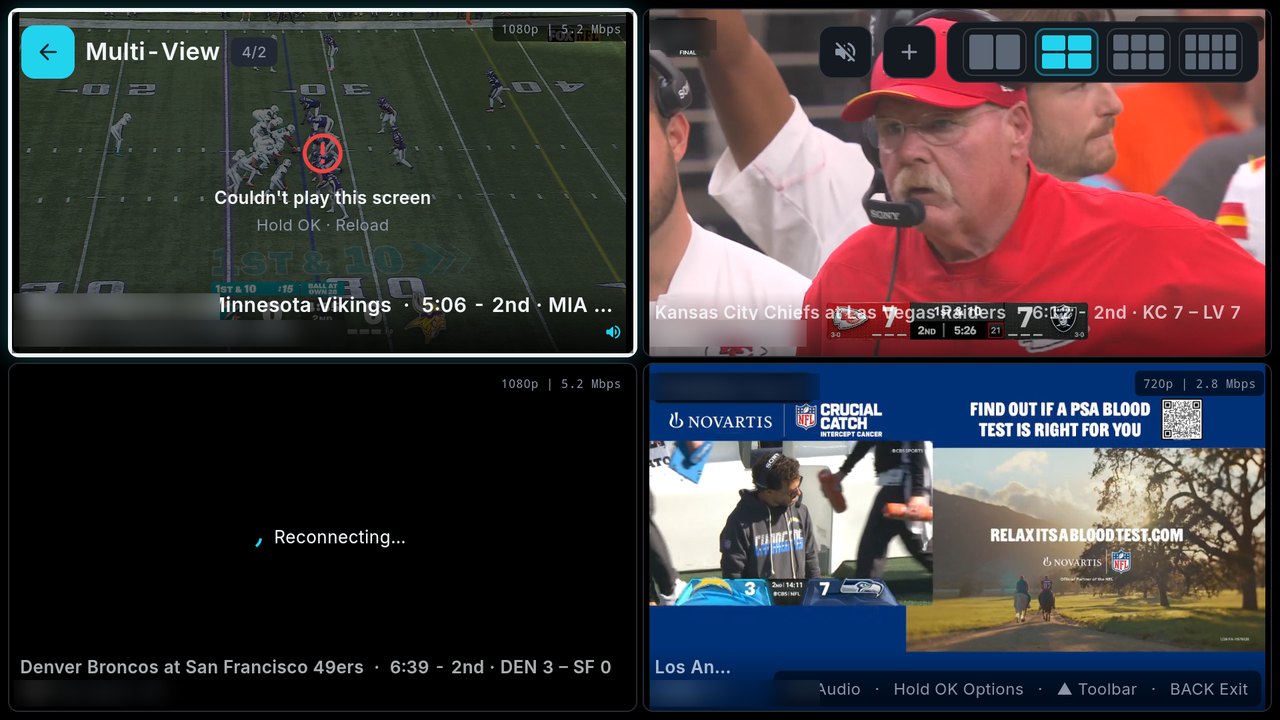
Multi-View on the Shield
- In Live TV, hold OK on a channel and choose Multi-View.
- Press OK on an empty slot to add a channel from any of your providers.
- OK on a screen moves the sound to it; hold OK opens its menu (Change Channel, Reload, Audio Mixing, Change Layout, Remove).
- UP from the top row reaches the layout bar.
Tiles reconnect by themselves when a stream drops (since 3.4). How many screens you can fill depends on your provider's connection allowance, often one or two streams per login; screens from a second provider use that provider's allowance. For game days, the Sports Hub's Multi-View button fills a grid with games in progress. See the Multi-View guide.
Frequently asked questions
Is TIVRA on Google Play for the NVIDIA Shield?
Yes. Search TIVRA in the Play Store on the Shield. The tivratv.com download (Downloader code 3059562) gets each release before Play does; both are the same app and keep your settings when you switch.
Should audio passthrough be on or off?
It is on by default, which suits a receiver or soundbar that decodes surround sound. If Dolby channels freeze on your setup, turn it off and TIVRA decodes the audio itself.
Can I record to a USB drive on the Shield TV?
On the Shield TV Pro, yes: use the drive as portable storage and pick it in Settings, Storage. The tube Shield TV has no full-size USB port, so use an SMB network share instead.
How many channels can Multi-View show?
Several at once, in layouts you pick from the top bar. The practical limit is your provider's connection allowance; screens from a second provider use that provider's own allowance.
Try TIVRA on your Shield
7-day free trial, no card required. Install from Google Play and add your own provider from your phone.
Start Free Trial Get it on Google Play