What's New in TIVRA 3.3: Sports, Catch-up, Profiles
The TIVRA 3.3 line ran from 3.3.0 to 3.3.9 over a few busy weeks. If you updated straight across it, for example through Google Play, this is everything that changed, grouped by what you'll notice rather than by version. Release numbers are in brackets where it helps.
Sports Hub
- Many more leagues (3.3.0 onward). 3.3.0 took the Sports Hub to 42 leagues, with defaults for your region (US, Canada, UK, Europe, Australia, India, Mexico). Golf, racing, tennis and MMA arrived as event cards in 3.3.1, international soccer in 3.3.2, and more leagues in 3.3.7.
- Organised to read at a glance: a Live now row, sport filter chips, rows ordered with your teams first, and a "Only games with a channel" filter.
- Hold OK on a game for its channels and the box score on any remote, no PLAY button needed (3.3.0).
- Change source without losing the game (3.3.2). Hold OK while watching and pick another channel carrying the same match; it switches in place. Same in Multi-View.
- The scores overlay (3.3.8). Hold DOWN while watching to see today's games one sport at a time over the picture. UP and DOWN flip the sport, LEFT and RIGHT move between games, OK switches to that game and keeps the overlay open.
- Star the games you care about (3.3.8). Starred games come first and get their own page in the overlay.
- Live game data on every card (3.3.8): possession and down and distance on football, count and runners on baseball, goals and cards on soccer, plus college rankings and betting lines (which you can turn off).
- Find a channel (3.3.8) searches every provider by name when a game isn't matched; your pick is remembered and synced.
- Matching rules from TIVRA's servers (3.3.5). When a league, network or provider names things differently, a new rule reaches every box within hours, with no app update.
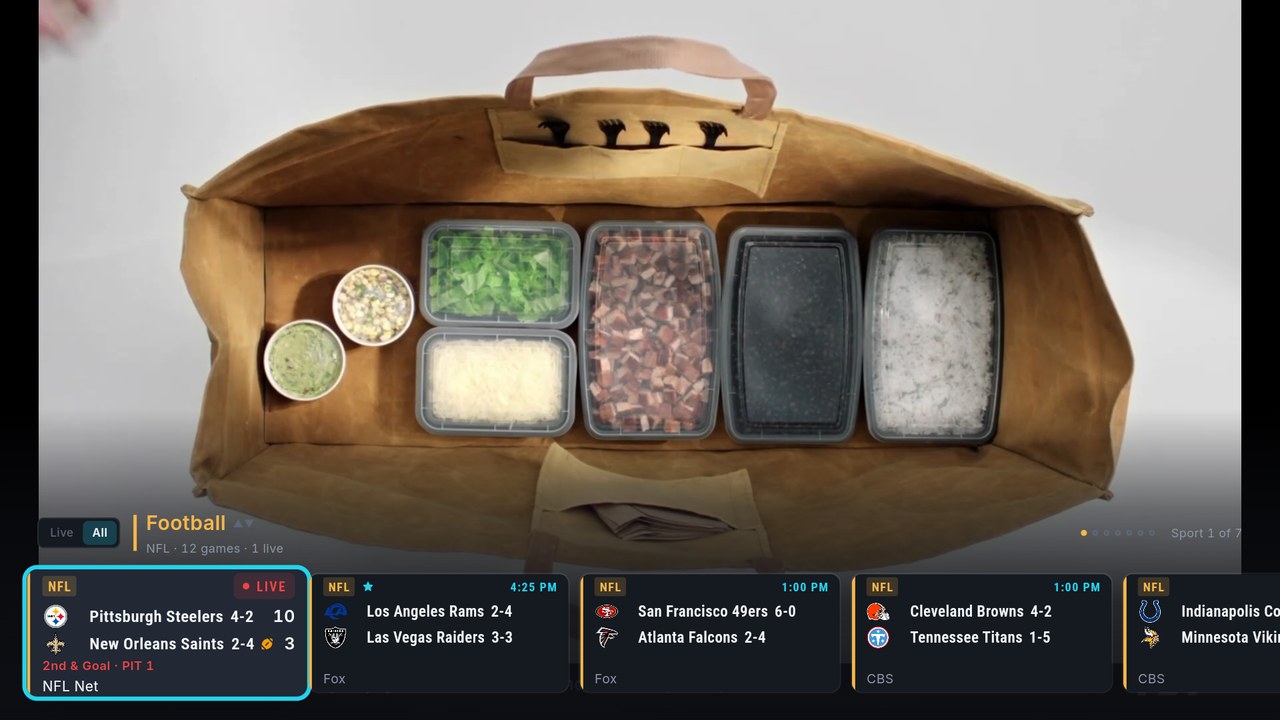
How it all works, key by key: Sports Hub help and live box scores while you watch.
Guide, Live TV and channels
- Your own channel numbers and names (3.3.8). Give any channel the number you know, rename it, and reorder channels inside any category. Numbers and names sync to your account.
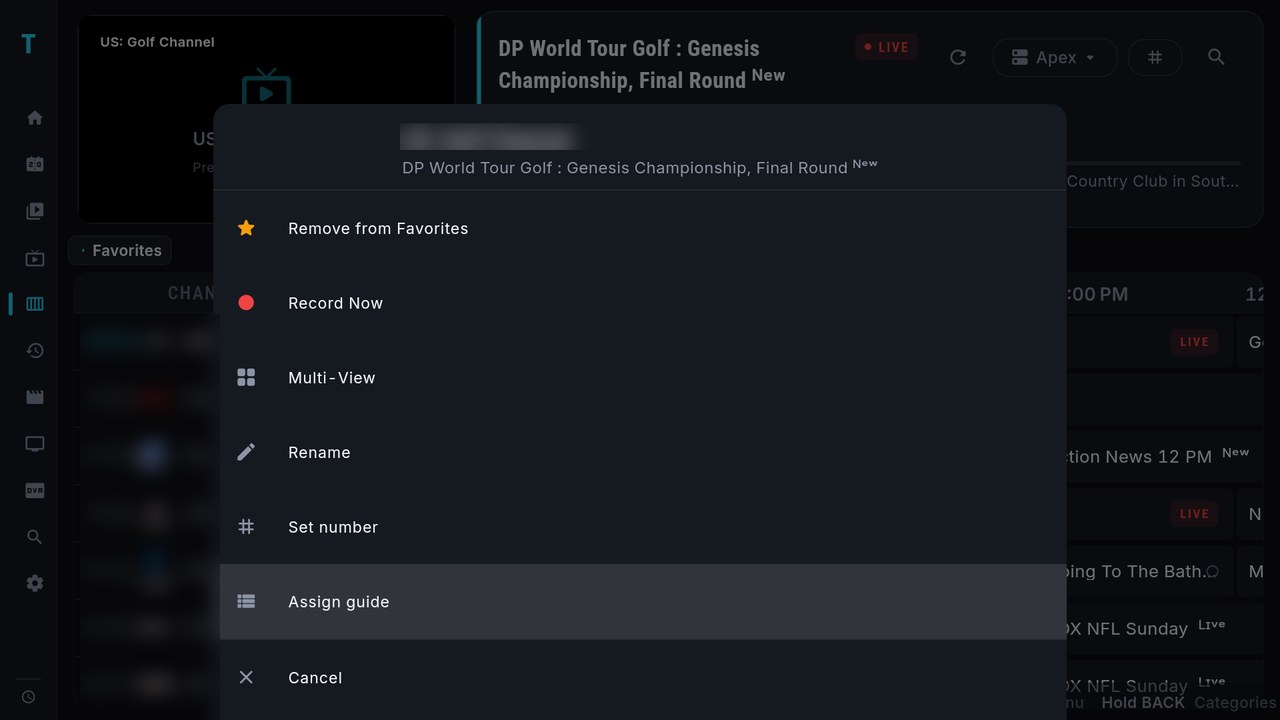
- A channel menu in the Guide (3.3.8). LEFT from the programme on now lands on the channel; hold OK there for favorite, Record Now, Multi-View, Rename, Set number and Assign guide, which points a channel with wrong or missing guide data at the right listing.
- Search covers the guide (3.3.8): type a show's name and the channels airing it in the next 24 hours join the results.
- A new-look Guide (3.3.4) with an info panel on top, larger titles, and FF/RW paging the channel rows.
- Preview before playing (3.3.1). Turn it on under Settings › Playback: OK previews a channel in the side pane, OK again goes full screen.
- Move favorites (3.3.1) any distance in one go.
Catch-up
- A Catch-up page (3.3.1): pick a category, see its archive channels on the left and their shows by day on the right.
- The guide reaches back up to 7 days (3.3.1), as far as each provider's archive goes. Hold LEFT on now steps into the past (3.3.8).
- M3U catch-up (3.3.1) for playlists that carry catch-up attributes, and hold OK on a show to jump between days (3.3.2).
Profiles and categories
- Profiles (3.3.5), one per person, with neon avatars. Favorites, recents, watch history, Trakt and SIMKL, layout and sports preferences, hidden and renamed channels and custom categories all follow the profile.
- Categories on the left (3.3.4), on Live TV, the Guide, Movies, Series and Catch-up, or the classic row if you prefer (3.3.5, per device).
- Hold OK on a category to move or hide it, on every page. Order and hidden categories sync to your account and the dashboard.
Providers and the guide behind the scenes
- Stalker portals (3.3.4) join Xtream Codes and M3U as a provider type.
- Add an M3U or get.php link from the app (3.3.2), with a custom guide URL per provider, or bring your own XMLTV guide.
- One Status page (3.3.3) shows every provider's playlist and guide sync, with its own Sync and Guide buttons (3.3.4). One bad provider no longer stops the guide for the others.
- A lighter guide (3.3.5). For most providers the guide now comes from TIVRA: small and fast, with an overnight sync time you set once.
- Every provider on the device in search, the guide and the Sports Hub (3.3.1).
Library and watch tracking
- SIMKL joins Trakt (3.3.1). Mark episodes, seasons and movies watched or unwatched, synced to every connected tracker.
- Jellyfin and Emby browse live (3.3.5) from your server, so libraries of any size work, with a search page for your library. Resume points update while you watch (3.3.4).
- Your Trakt watchlist as a Home row (3.3.0), and Silo as a named media-server option (3.3.7).
Player and settings
- Audio passthrough switch (3.3.5), on by default; turn it off if Dolby channels freeze on your box.
- A clock in the player (3.3.8), and Audio, Subtitles, Aspect and A/V Sync on a second row of controls (DOWN to reveal).
- Settings readable from the couch (3.3.8): TV-size text and one row style everywhere.
- Send diagnostics (Settings › About) uploads the app's recent log when something goes wrong.
Notable fixes
- Fire OS 6 devices (first-generation Fire TV Stick 4K and Cube, older Android 7 boxes) no longer crash at launch (3.3.6).
- A full guide refresh no longer freezes the box (3.3.4).
- A tap on an infrared remote no longer reads as a hold (3.3.4).
- Network remote apps that send Back twice no longer open the exit prompt (3.3.8).
- Movies and Series lists sorted by Recently Added load again (3.3.9).
Next up: what's new in TIVRA 3.4. To update, see How to upgrade TIVRA. TIVRA is a player; you bring your own provider or library.
Frequently asked questions
How do I open the scores overlay in TIVRA?
While a channel plays full screen with the controls hidden, hold DOWN. Or press OK, move RIGHT to Scores and press OK.
Can I renumber and rename channels?
Yes, since 3.3.8. Hold OK on a channel in the Guide for Rename and Set number, and reorder channels inside any category. Changes sync to your account.
How far back does catch-up go?
Up to 7 days, as far as each provider's archive goes.
Try the latest TIVRA
7-day free trial, no card required. Add your own provider from your phone in minutes.
Start Free Trial Get it on Google Play